Classes and Sections
The academic setup workspace is where school admins manage academic years, grade sections, room details, and class-teacher assignments.
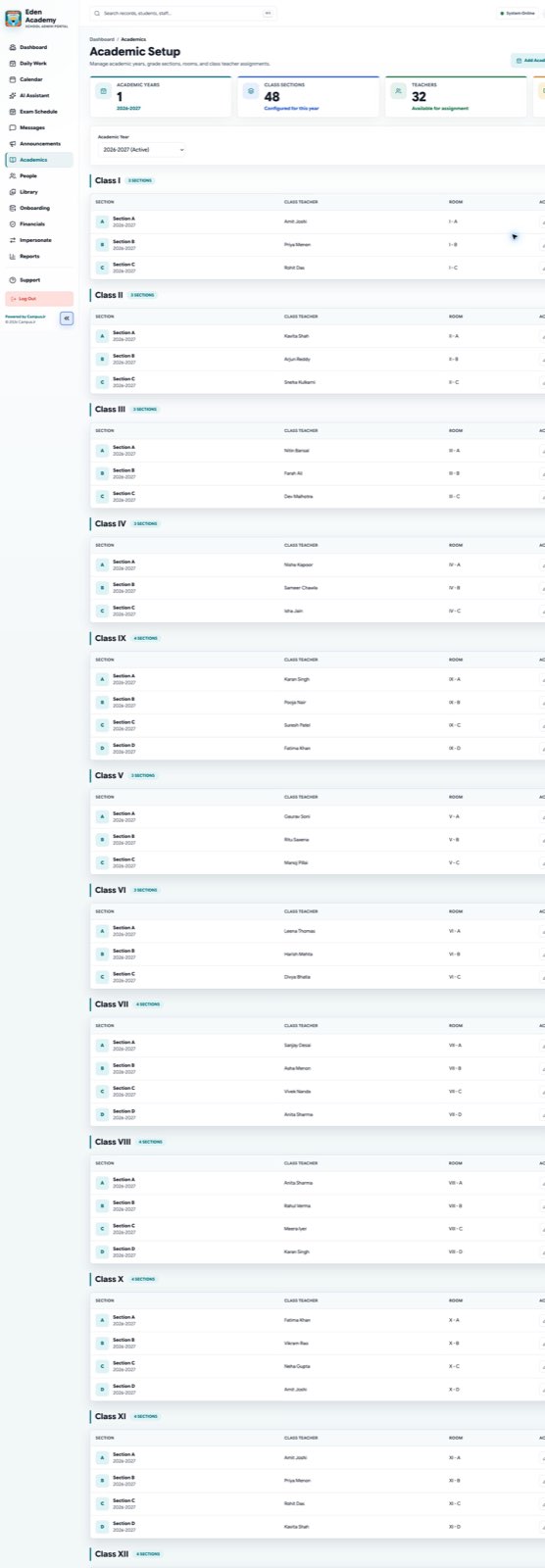
Finish class and section setup before daily attendance, timetable review, or fee assignment begins.
Main tasks
- Create or activate the academic year.
- Add class sections for each grade.
- Assign class teachers and review section readiness.
- Open class-level pages for deeper section review.
- Keep timetable ownership and room details current.
- Manage section-level exam definitions and assessment timing.
Recommended setup order
- Create the academic year.
- Add each grade and section.
- Assign teachers to the correct sections.
- Confirm student enrollment is ready.
- Review timetable and calendar alignment.
When to edit sections
- A section changes room or teacher ownership.
- Student strength requires a new section.
- Timetable or curriculum follow-up shows a mismatch.
- A new academic year needs a fresh class structure.
Exam setup from class sections
Section pages are also where school admins define and manage exams for that section. Use them for:
- exam name and subject mapping
- exam date and marks thresholds
- locked or open exam status review
- direct links to workbook-based schedule upload